

A rounded QR code can soften a rigid grid and fit a modern brand system, but “rounded” describes several different edits. A designer might round the corners of full-size modules, replace modules with circles, shrink every dot, or restyle the three finder patterns. Those changes do not spend the same scanning margin. This guide separates them in a controlled experiment and shows why the finder patterns deserve different treatment. Begin with a conventional baseline from the CraftMyQR generator, then compare every decorative export with that baseline.
Most design advice reduces the decision to “use high error correction and test it.” That misses two practical variables: how much dark area remains inside each module cell, and whether the scanner still sees conventional finder geometry. Our lab holds the payload, version, colors, quiet zone, and image conditions constant while changing those two variables.
What Changes in a Rounded QR Code?
A normal QR symbol uses a square module grid. Each module is logically dark or light, but the renderer controls how that state appears. The conventional square fills its cell. A full-diameter circle touches the middle of all four cell edges but leaves the corners white. At 70% diameter, the circle removes much more dark area and creates visible gaps between neighboring modules.
The three large corner markers are finder patterns. Scanners use them to locate the symbol and estimate orientation. Timing patterns, alignment patterns, format information, and data modules serve other structural roles. Applying one decorative rule to every dark cell therefore changes both the encoded field and the features used for detection.
“It scanned on my phone” cannot reveal which stage retained enough margin. A design may remain easy to locate but lose data after blur, or it may preserve data modules while weakened finders prevent detection. Testing preserved and restyled finder patterns separately exposes that difference.
Why Module Fill Ratio Matters
Module fill ratio describes the shape’s width relative to its logical cell. A circle at 100% width has a diameter equal to the cell width. At 80%, its diameter leaves a 10% inset on each side. The lost dark area is larger than the width reduction suggests because circle area follows the square of the radius.
Smaller dots can look cleaner on a large screen, yet resizing and camera blur average dark and light pixels together. A narrow dark dot may become mid-gray. Adjacent white gaps may also disappear or merge inconsistently after JPEG compression. The useful question is not whether circles are allowed; it is how much sampling margin remains in the final delivery format.
Academic work on aesthetic QR codes treats visual quality and scanning robustness as an explicit tradeoff. For example, the ART-UP research paper models module-level scanning probability instead of assuming any decorative image remains readable because error correction exists. A practical brand workflow should adopt the same principle: measure the actual output rather than relying on style labels.
Controlled Method
We generated one Version 4, error-correction-level M symbol containing https://craftmyqr.com/r/quiet26. Every variant used dark navy modules on white with a four-module quiet zone.
Six module treatments were tested:
Each treatment had two finder options. The protected version kept modules inside all three 7 × 7 finder regions square and full size. The fully styled version applied the decorative shape to finder modules as well.
Five deterministic conditions tested every design: clean 300-pixel output, reduction to 170 pixels, 0.75-pixel blur, JPEG quality 60, and a 160-pixel reduction with 0.65-pixel blur. That produced 60 cases. Both jsQR 1.4.0 and ZXing 0.21.3 had to return the exact payload for a strict pass.
The test uses software decoders and digital renders. It does not represent a percentage of consumer phones, nor does it model print gain, colored stock, camera exposure, perspective, reflections, or motion. Its value comes from holding everything constant except module styling and finder treatment.
- full-size square modules;
- full-size rounded rectangles with a 35% corner radius;
- full-diameter circular modules;
- circular modules at 90% of cell width;
- circular modules at 80% of cell width;
- circular modules at 70% of cell width.
Results: Finder Protection Preserved More Margin
The conventional square control passed every condition, as expected. Full-size rounded and circular data modules also retained 5/5 when the finder regions stayed square. That result shows that changing the internal module silhouette did not automatically break this symbol.
Styling the finder regions reduced strict passes even when the decorative modules kept their full width. Full-size rounded modules fell from 5/5 to 3/5, while full circles fell from 5/5 to 4/5. Shrinking circular modules increased the difference. At 70%, protected finders retained 3/5; fully styled finders retained 0/5.
These outcomes do not create a universal 80% or 90% threshold. Another version, mask pattern, decoder, output size, or print process can change the boundary. They do show that finder styling consumes detection margin separately from dot size. A dot QR code can fail sooner when both variables change at once.
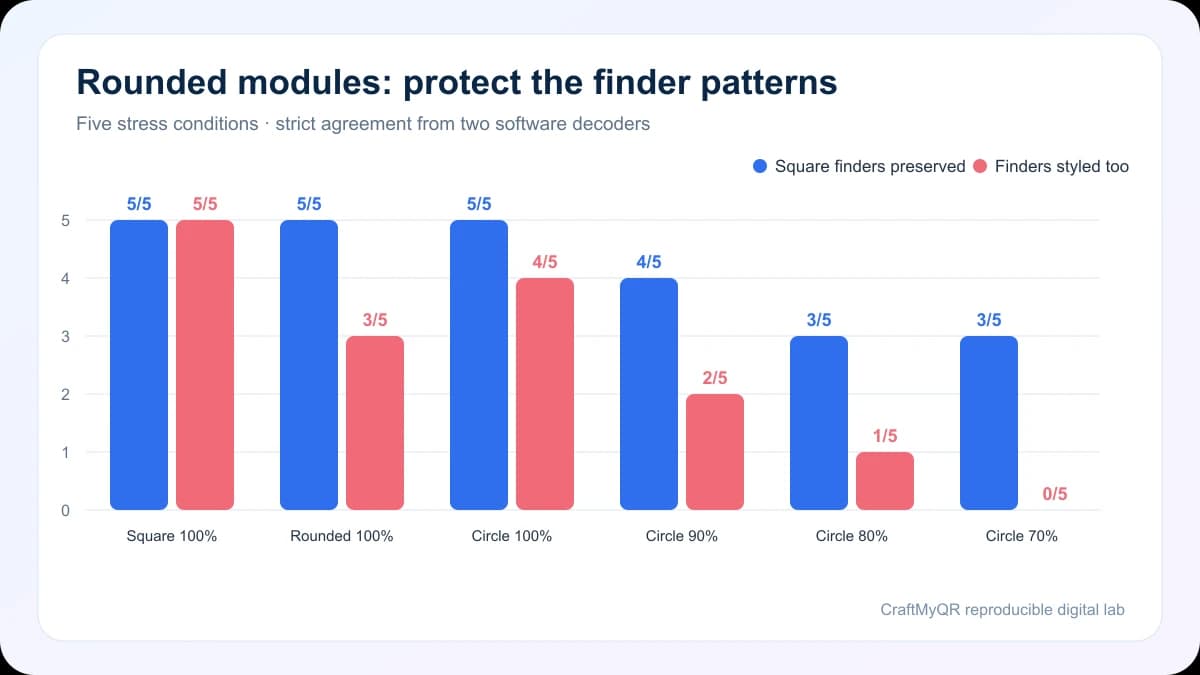
| Module style | Square finders preserved | Finders styled too |
|---|---|---|
| Square, 100% | 5/5 | 5/5 |
| Rounded, 100% | 5/5 | 3/5 |
| Circle, 100% | 5/5 | 4/5 |
| Circle, 90% | 4/5 | 2/5 |
| Circle, 80% | 3/5 | 1/5 |
| Circle, 70% | 3/5 | 0/5 |
Preserve Finder Patterns Before Raising Error Correction
Designers often select error-correction level H as the first response to heavy styling. Higher correction adds redundant codewords, but it can also force a denser version for the same payload. At a fixed outer size, more modules mean fewer pixels or print dots per module.
Conventional finder geometry usually offers a cleaner first safeguard:
Error correction remains useful for a centered logo or limited surface damage, but it should not justify unbounded changes to structural patterns. The QR code not scanning guide can help identify whether detection, contrast, size, or destination problems cause a failure.
- Keep the three corner markers dark, square, and high contrast.
- Preserve their white rings and surrounding separation.
- Apply rounded treatment only to ordinary dark modules.
- Use the largest practical module fill ratio.
- Increase physical size before increasing decorative complexity.
Choose Between Rounded Rectangles and Dots
Rounded rectangles retain more of a square module’s area while softening its corners. Full-diameter circles remove the four corners of each dark cell. Smaller circles remove additional area and isolate neighboring dark modules.
For broad public use, start with full-size rounded rectangles or full circles while preserving square finders. A very small-dot aesthetic fits controlled environments better, such as an internal app with known devices and a generously sized code. Consumer packaging, outdoor posters, and long-lived printed material should keep more conservative geometry.
Visual density matters too. A large, low-version symbol can tolerate an aesthetic treatment better than a high-version symbol squeezed into the same physical square. The minimum QR code size lab explains how data density changes the module budget.
Test the Final Asset, Not the Editor Preview
A vector preview at 800% zoom hides the transformations that users encounter. The design may later be rasterized, scaled to a fractional pixel width, compressed by a content platform, printed on absorbent stock, or photographed out of focus.
Use this proof sequence:
If the standard control works while the styled version fails, change one design variable at a time. Restore finder patterns first, then enlarge dots, increase contrast, enlarge the complete symbol, or reduce payload density.
- Save an untouched square-module control with the same payload.
- Export the decorative design at the smallest intended size.
- Verify that module boundaries align cleanly with the raster pixel grid.
- Test PNG, final PDF, and any platform-compressed copy separately.
- Scan at realistic distance rather than filling the camera frame.
- Add mild blur or downsampling to reveal a fragile margin.
- Print on the real material and finish.
- Compare several default camera apps, not only a dedicated scanner.
Color, Logos, and Shapes Spend the Same Margin
Module shape rarely changes alone. A branded design may also use colored modules, an embedded logo, a transparent background, or an inverted palette. Each choice can reduce a different part of the recognition margin.
Avoid approving each feature independently and assuming the combination will pass. A rounded design that works in black and white may fail after low-contrast color and a large central logo are added. The complete exported asset is the test unit.
The QR codes in print guide covers vector export and production proofs. When creating the baseline in CraftMyQR, keep the destination concise, preserve a light solid background, and download a high-quality format before any external styling step.
When a Standard Grid Is the Better Choice
Use conventional square modules when the audience has unknown devices, the code will print very small, the background or material is difficult, or scanning controls access to essential information. A decorative treatment offers little value if the call to action, destination, or physical placement already communicates the brand.
Standard geometry also makes later troubleshooting easier. Printers, agencies, and local teams can compare the live asset against a recognized baseline without reverse-engineering custom rendering choices. Save both the standard source and the approved decorative export with revision names.
Conclusion: Style a Rounded QR Code Selectively
A dependable rounded QR code changes ordinary modules more cautiously than finder patterns. In our controlled test, full-size rounded and circular modules retained 5/5 strict passes when square finders stayed protected. Styling the finders reduced those results, and shrinking every dot widened the gap.
Generate a clear baseline with CraftMyQR, preserve conventional corner markers, and test the complete styled export after every delivery transformation. Rounded modules can support the visual system, but finder recognition and final-size sampling should set the design boundary.
Frequently Asked Questions
Do rounded QR codes scan?
They can scan when modules remain large, contrast stays strong, the quiet zone remains clear, and finder patterns retain recognizable geometry. The exact styled export still needs testing after resizing, compression, and printing.
Are circular QR code dots less reliable than squares?
Circles remove dark area from each logical module cell, especially when their diameter falls below the full cell width. That can reduce tolerance to blur and downsampling, although generous sizing may preserve sufficient margin.
Should QR code finder patterns stay square?
Keeping finder patterns square is a strong default. Our controlled test showed higher strict pass counts for every decorative non-square style when the three finder regions remained full-size and conventional.
What is a safe dot size for a QR code?
No universal percentage applies across versions, decoders, dimensions, and materials. Begin near full cell width, preserve the finders, and reduce dot size only while final-format tests retain ample margin.
Does error correction make decorative QR codes safe?
Error correction can recover some damaged encoded data, but it does not guarantee detection of heavily restyled finder patterns. Higher levels may also create denser symbols, so design geometry still requires direct testing.
Can I add a logo to a rounded QR code?
Yes, but the logo and rounded modules consume different parts of the scanning margin. Keep the logo centered, use appropriate error correction, protect finder patterns, and test the complete combined design.
Should I export a rounded QR code as PNG or SVG?
SVG preserves geometric edges during layout and scaling. PNG can work when generated at the exact final pixel dimensions without enlargement. Regardless of format, test the final placed artwork and printed proof.
Why does my styled QR code work large but fail small?
At smaller dimensions, each module receives fewer camera pixels. Rounded corners, small dots, blur, and compression then average dark and light areas together until the decoder can no longer sample the grid reliably.
Need to create a QR code now?
Create and preview your QR code with our free generator. For long-term materials like menus, packaging and posters, consider upgrading to dynamic QR codes.