
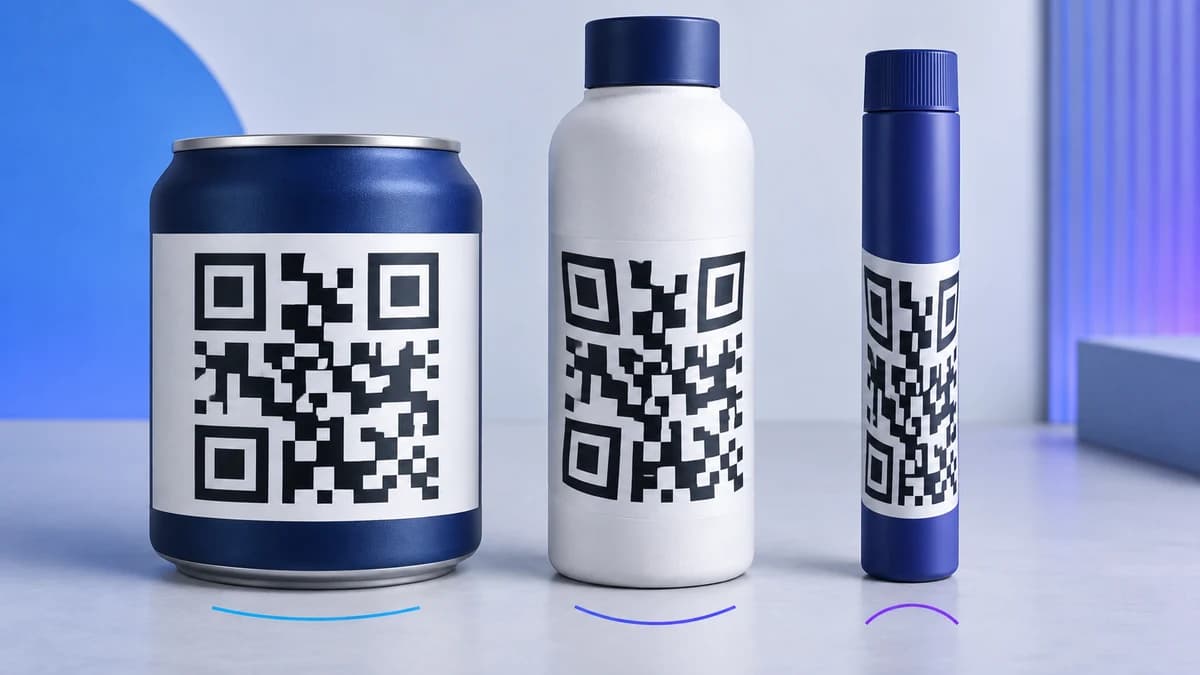
QR codes on curved surfaces can work, but the important dimension is not simply the bottle diameter or the printed code width. What matters is how much of the cylinder’s circumference the code occupies. As a label wraps farther around the container, the camera sees compressed modules near both edges and fewer modules on one apparent plane. This guide turns that geometry into a measurable design ratio and a reproducible digital test. For packaging campaigns, start with the CraftMyQR product packaging workflow, then proof the exact container before production.
Generic advice such as “make the QR code larger” can become counterproductive on a narrow bottle. A wider code increases module size, yet it also wraps farther away from the camera. The center looks clear while the left and right sides bend toward tangency. A better design question is: how wide is the printed symbol compared with the cylinder circumference?
Why QR Codes on Curved Surfaces Become Distorted
A flat QR symbol presents an approximately square grid to the camera. Wrap it around a cylinder and equal horizontal distances on the label no longer occupy equal distances in the image. Modules near the center remain relatively wide. Modules near the edges compress because the surface turns away.
Curvature creates several connected problems:
Increasing error correction does not reverse geometric distortion. It may help recover some unreadable data modules after detection, but the scanner must still locate the finder patterns, estimate the grid, and sample module centers correctly.
Researchers have tested QR readability on curved food packages using factors such as reading distance, container diameter, code size, and encoded character count. That work confirms that these variables interact rather than acting independently. See the published curved-package QR readability study for a physical experimental approach.
- outer modules appear narrower than central modules;
- the finder patterns may sit on different apparent planes;
- glossy containers introduce moving highlights across the curved field;
- autofocus may favor the center while the edges soften;
- a hand or shelf lip may hide the far side of a wide label;
- camera perspective combines with the cylindrical projection.
Calculate the Code-to-Circumference Ratio
Measure the outside diameter of the labeled section, not the nominal package size. Calculate the circumference as:
circumference = π × diameter
Then divide the printed QR width by that circumference:
wrap ratio = QR width ÷ circumference
For a 60 mm bottle, the circumference is about 188.5 mm. A 25 mm code occupies 13.3% of that circumference. A 40 mm code occupies 21.2%. Although the second symbol has larger modules, it also experiences much stronger wrap.
A tapered shoulder, oval bottle, pouch, or sphere does not follow this simple cylinder model. Still, the ratio provides a useful first warning: if the symbol covers a large part of the visible contour, “make it bigger” may be the wrong fix.
Method and Variables
We created two error-correction-level M symbols. The short payload used Version 4, while a longer campaign URL was forced into Version 8. The higher version contains more modules, so each module receives fewer pixels when the complete symbol occupies the same image height.
Each QR render included a four-module quiet zone. We mathematically wrapped the flat image around a cylindrical surface and projected it back toward a centered virtual camera. Seven ratios described QR width as a share of the full cylinder circumference: 8%, 12%, 16%, 20%, 24%, 28%, and 32%.
We also rotated the source symbol 90 degrees before projection. QR codes are orientation independent in principle, but rotation moves different finder and data patterns through the horizontally compressed regions. Both orientations passed through three image conditions: clean 360-pixel output, a 220-pixel reduction with light blur, and a 180-pixel JPEG at quality 62.
That produced 84 cases: two payload densities × seven wrap ratios × two orientations × three image conditions. A strict pass required jsQR 1.4.0 and ZXing 0.21.3 to return the exact original payload.
This is a declared digital projection model, not a physical bottle trial. It excludes focus depth, reflections, label seams, paper texture, transparency, camera exposure, hand movement, and container taper. Its purpose is to isolate geometric wrap under controlled conditions.
Results Across Seven Wrap Ratios
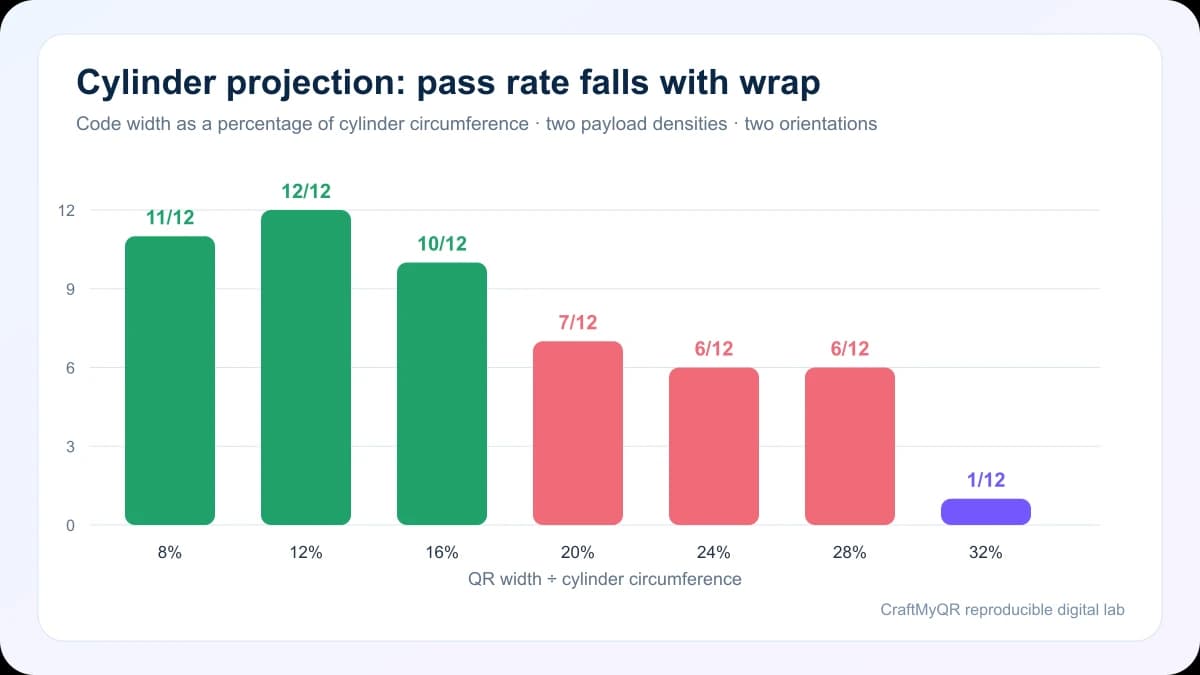
The 12% group passed every case, while 8% lost one long-payload, rotated JPEG case in ZXing. That small non-monotonic result is a reminder that rasterization and decoder preprocessing can move individual outcomes. It does not mean 12% is inherently better than 8%.
The larger pattern is clearer. Results remained strong through 16%, then dropped at 20%. At 32%, only one of twelve cases achieved strict agreement. The long Version 8 payload failed earlier and more consistently than the Version 4 symbol because its denser grid gave each horizontally compressed module less sampling room.
These numbers do not establish a universal bottle threshold. They support using roughly 16% or less as a conservative starting point for a centered cylindrical layout, followed by a physical proof. Materials, camera distance, and real optical effects can move the usable limit in either direction.
| QR width ÷ circumference | Strict passes |
|---|---|
| 8% | 11/12 |
| 12% | 12/12 |
| 16% | 10/12 |
| 20% | 7/12 |
| 24% | 6/12 |
| 28% | 6/12 |
| 32% | 1/12 |
Why Payload Density Matters on a Bottle
Two labels with the same outer dimensions can behave differently because their QR versions differ. A longer destination, tracking parameters, or embedded text can force more modules into the grid. Curvature then compresses already smaller modules at the edges.
Shortening the encoded value can therefore improve a QR code on bottle without changing the visible label size. A controlled redirect or concise URL may lower the symbol version. The dynamic QR code page explains when an editable destination can support a stable printed code.
Do not remove useful tracking parameters blindly. Decide whether the QR service already records scans and whether downstream analytics needs additional campaign data. The goal is a short, durable encoded address with clear ownership, not a fragile public URL shortened by an unknown third party.
Placement and Orientation Decisions
Place the symbol on the broadest, straightest section of the container. Avoid shoulders, necks, base radii, embossed ribs, squeezable seams, and label overlaps. Center the code on the expected viewing face so the user can see all three finder patterns without rotating the package.
Rotating a square code does not eliminate curvature. Our orientation cases produced different individual failures because the module pattern moved relative to the compressed axis, yet neither orientation consistently defeated severe wrap. Product designers should choose orientation based on the available flat band, surrounding copy, and physical proof rather than assuming a 90-degree turn solves the geometry.
When a narrow cylinder cannot provide enough room, alternatives include:
The minimum QR code size guide helps balance module dimensions against scan distance after you limit the wrap ratio.
- putting the code on a flat cap or carton panel;
- attaching a hang tag or flag label;
- reducing payload density before reducing module size;
- using a larger secondary package;
- printing two identical codes on opposite faces rather than one oversized wraparound code.
Curved Packaging Adds Glare and Focus Risk
Geometry was the only intended distortion in our model, apart from controlled resizing, blur, and JPEG compression. Real containers add illumination problems. Gloss film produces a moving specular highlight, and a cylinder can reflect a lamp across a vertical band that crosses a finder pattern.
Prefer a matte or low-glare patch under the entire symbol. Maintain dark modules on a uniform light panel, preserve the quiet zone, and avoid metallic ink or clear varnish over the code. If the package must remain glossy, test it under overhead retail lighting, window light, and the phone’s torch.
Focus also changes with distance. A small bottle held close can place the center and edges at measurably different depths, while a distant scan leaves too few camera pixels per module. The QR codes in print guide covers final-size exports and representative proofing.
Physical Proof Protocol
A useful approval test should reproduce the actual use case:
A single successful scan from the designer’s phone is not approval. The proof should expose the most curved placement, densest live payload, smallest production variation, and least favorable common light.
- Print the complete label at final dimensions with the intended finish.
- Apply it to production containers, not only flat sheets.
- Test a filled and empty flexible package if its shape changes.
- Scan straight on, slightly left, slightly right, above, and below.
- Repeat at the closest and farthest realistic distances.
- Include at least one recent and one older iPhone and Android device.
- Test bright retail light, dim ambient light, and glare-prone angles.
- Record the exact artwork revision that passed.
When to Use a Flat Alternative
Choose a flat location when the calculated ratio exceeds the available proof margin, the container tapers across the symbol, or artwork cannot provide a uniform light panel. Flat placement is also preferable for safety instructions, regulated information, payments, or any workflow where scan failure blocks an essential action.
For consumer packaging, pair the code with a concise call to action and a readable fallback URL. A person should know what happens before scanning, and the destination should remain mobile-friendly for the expected life of the package.
Conclusion: Size QR Codes on Curved Surfaces by Ratio
Reliable QR codes on curved surfaces need more than a minimum width. Compare the symbol width with the container circumference, keep the payload compact, protect the quiet zone, and test the real finish. Our digital model retained 10 of 12 strict passes at 16% wrap but only 7 of 12 at 20%, with denser symbols failing sooner.
Use the CraftMyQR packaging solution to create and manage the destination, then let a production-container proof approve the placement. If the code must wrap too far, move it to a flatter surface instead of enlarging it around the bottle.
Frequently Asked Questions
Can QR codes work on curved surfaces?
Yes, when the code occupies a modest share of the circumference, remains fully visible, and retains adequate module size. A physical proof must also account for focus, glare, material, taper, and viewing angle.
How large should a QR code be on a bottle?
There is no single width for every bottle. Calculate module size for the expected scan distance, then check the code width against the bottle circumference so enlargement does not create excessive wrap distortion.
What percentage of the bottle circumference can the code cover?
Our digital model remained comparatively strong through 16% and dropped at 20%, but that is not a universal limit. Use 16% or less as a starting point and validate the actual container.
Should I rotate a QR code on curved packaging?
Rotation changes which modules encounter horizontal compression but does not remove curvature. Choose the orientation that fits the straightest panel and surrounding artwork, then compare both options on a physical production proof.
Does higher error correction fix a curved QR code?
Not reliably. Error correction may recover some damaged data after detection, but strong curvature can distort finder patterns and module geometry before recovery begins. Improve placement and wrap ratio first.
Is a short URL better for a QR code on a bottle?
A shorter encoded value can produce a lower-version symbol with fewer, larger modules at the same printed size. That added sampling margin often helps when curvature compresses modules near the label edges.
Should I use matte or glossy packaging around the QR code?
A matte or low-glare patch is safer because it reduces moving reflections across the symbol. Glossy material can still work, but test the finished container under realistic lamps, windows, and phone torch use.
What if the bottle is too narrow for the QR code?
Move the symbol to a flat cap, carton, hang tag, or flag label. Another option is a shorter payload that lowers symbol density without shrinking the physical module size or cropping the quiet zone.
Need to create a QR code now?
Create and preview your QR code with our free generator. For long-term materials like menus, packaging and posters, consider upgrading to dynamic QR codes.