
A QR code quiet zone is the clear border that separates the symbol from nearby text, photographs, borders, and other visual detail. Remove that separation and a code that looks perfect in the design file may become difficult to locate after resizing or compression. This guide combines the official four-module rule with a reproducible CraftMyQR experiment, so you can distinguish a lucky scan from a production-safe layout. You can create the source symbol with the CraftMyQR QR code generator, but the final artwork still needs its own proof.
Many online examples say that two modules may work or show a phone reading a code with no visible margin. Those demonstrations answer only whether one decoder accepted one image. They do not establish a reliable minimum for unknown cameras, backgrounds, print processes, or viewing distances. Our test deliberately places the same code against four surroundings and adds three image conditions before two software decoders must agree on the exact payload.
What Is a QR Code Quiet Zone?
The quiet zone is not unused decoration. It gives detection software a clean transition from the surrounding design to the symbol. The three large finder patterns help a scanner establish position and orientation, but clutter touching the outer modules can create false edges or make the complete symbol harder to isolate.
DENSO WAVE’s QR Code guidance specifies a clear margin four modules wide on every side. A module is one square in the QR grid, not a fixed number of millimetres or pixels. Therefore, the physical QR code margin grows with the module size.
For example, a 33-module symbol with four modules on every side occupies 41 modules across when the border is included. If each module prints at 0.5 mm, the symbol itself measures 16.5 mm and the full protected area measures 20.5 mm. Adding “2 mm of padding” without checking module size can accidentally comply in one layout and fail in another.
Why Some Codes Scan with Less White Space
Modern decoders use image cleanup, thresholding, perspective correction, and multiple detection strategies. A clean, large code on a plain white page can provide effective white space beyond the exported file even if the image itself contains no border. That surrounding page becomes an accidental quiet zone.
The situation changes when the code sits on a photograph, colored packaging, a table border, or a patterned sign. Compression can also mix neighboring pixels into the edge of the symbol. A screenshot that appears to show “zero margin” may still have several white pixels around it after layout or browser rendering.
This explains why a reduced QR code white space can succeed during an informal desk test. It does not mean the layout retains the same margin after a designer crops the asset, a social platform recompresses it, or a printer introduces registration error.
Reproducible Method
We generated one Version 4 QR symbol at error-correction level M containing https://craftmyqr.com/r/quiet26. The underlying module matrix remained identical. We rendered five variants with zero, one, two, three, or four light modules around every side.
Each variant was centered on four deterministic backgrounds:
We kept the source module size constant while increasing the outer margin. Each composition then passed through three conditions: a clean 360-pixel render, a 220-pixel reduction with 0.55-pixel blur, and a 180-pixel JPEG at quality 62. The test produced 60 cases in total.
Both jsQR 1.4.0 and ZXing 0.21.3 had to return the exact original URL for a strict pass. These are deterministic software checks, not measurements of phone-market success. They isolate the margin and surrounding background without claiming to reproduce autofocus, motion, glare, ink spread, or every camera pipeline.
- plain white, which acts as a forgiving baseline;
- alternating vertical bars that create strong nearby edges;
- a dark-and-light checker pattern;
- a seeded texture containing gradients and overlapping circles.
Results: Margin Helped, but the Pass Count Was Not Monotonic
Removing the border produced the weakest result: five of twelve cases failed strict agreement, including five of nine cases on non-white backgrounds. Adding even one light module sharply improved this particular digital set.
However, one module scored slightly better than four. That is not evidence that one module is safer. The result reflects interactions among resampling, background geometry, thresholding, and two specific decoders. Individual failures moved between the checker and textured backgrounds as the outer dimensions changed. A tiny pixel-grid change can help one thresholding path and hurt another.
The useful finding is not a new universal minimum. It is that less-than-standard margins can appear successful while remaining sensitive to details outside the QR symbol. The QR code quiet zone is inexpensive risk control, so there is little production value in optimizing it down to the smallest border that passed one test.
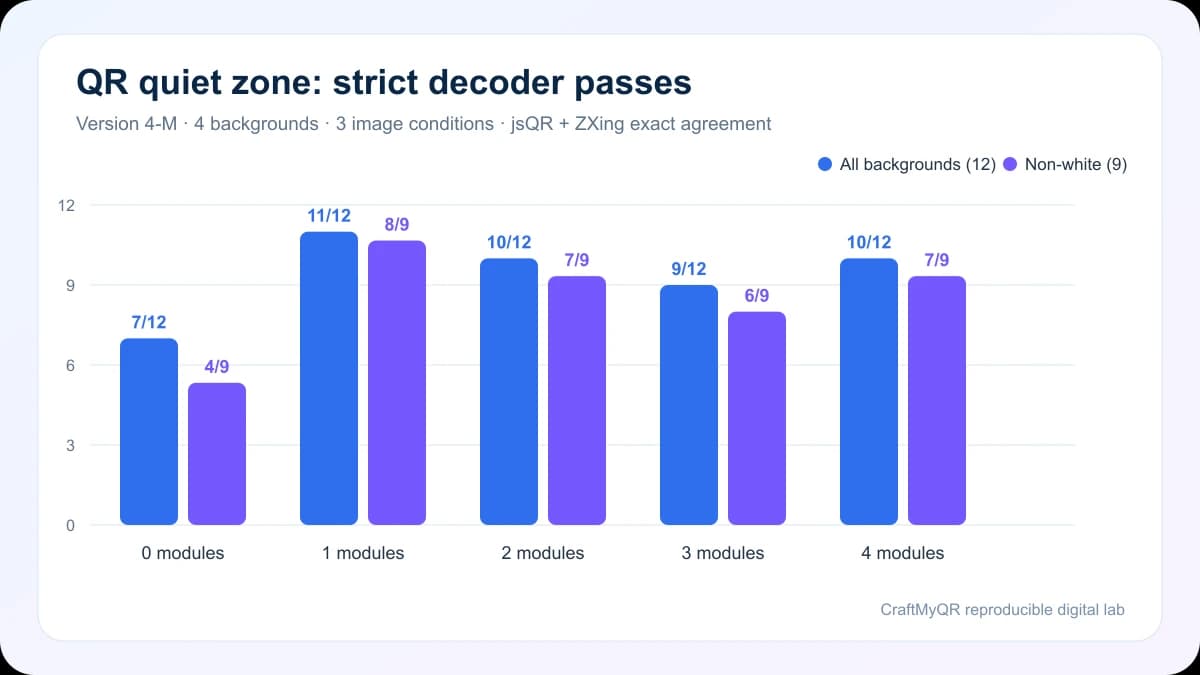
| Quiet zone | All backgrounds | Non-white backgrounds |
|---|---|---|
| 0 modules | 7/12 | 4/9 |
| 1 module | 11/12 | 8/9 |
| 2 modules | 10/12 | 7/9 |
| 3 modules | 9/12 | 6/9 |
| 4 modules | 10/12 | 7/9 |
Four-Module Standard Versus Experimental Decoding
A specification and a decoder experiment answer different questions. The four-module requirement defines how to prepare the symbol. The experiment describes how particular rendered images behaved after defined transformations.
Use the formal rule when designing a reusable asset, sending artwork to a printer, or serving an unknown audience. Treat below-spec results as diagnostic evidence only. They may explain why a cropped code still works on one device, but they should not become the template for the next print run.
This distinction also prevents a common reporting mistake. “Eight of nine cases decoded” is not an 89% consumer scan rate. Our nine non-white cases represent three backgrounds multiplied by three transformations, not a random sample of phones or users.
How to Calculate the Correct QR Code Margin
Count the modules across the symbol or obtain the version from the generator. Version 1 contains 21 modules per side, and every additional version adds four. Then reserve four extra modules on the left, right, top, and bottom.
Use this simple calculation:
Suppose a Version 4 symbol contains 33 modules and will print 24.75 mm wide. Each module is 0.75 mm. Its required clear border is 3 mm per side, and the complete protected square is 30.75 mm. If the available panel measures only 27 mm, shrinking the border is the wrong first move. Shorten the payload, use a less dense symbol, or enlarge the panel.
The minimum QR code size experiment explains why module size and viewing distance matter alongside margin. The quiet zone cannot compensate for modules that the camera cannot resolve.
- Determine the finished module size: symbol width divided by modules per side.
- Multiply the module size by four to get the required margin on one side.
- Add eight modules to the symbol width to calculate the complete protected area.
- Measure the final placed artwork, not only the original download.
Layout Mistakes That Destroy the Quiet Zone
Design software often removes the protection unintentionally. Watch for these cases:
White is not the only acceptable quiet-zone color. It should normally match a uniform light symbol background and remain clearly separated from the dark modules. A pale solid brand color can work if the complete design retains strong contrast. The QR codes in print guide covers export format, proofing, and material considerations.
- cropping the downloaded PNG tightly to the dark modules;
- placing a thin decorative frame inside the clear area;
- allowing a photograph or gradient to continue behind a transparent code;
- adding “Scan me” text so close that letter strokes enter the margin;
- using a clipping mask that trims one side more than the others;
- positioning the code across a fold, seam, bottle edge, or trim line;
- exporting at a fractional scale that softens the border and outer modules.
A Practical Preflight for Designers
Check the final artwork in this order:
If a previously working design stops scanning after layout, compare it with the QR code not scanning checklist. Restoring a clean border is often faster and safer than raising error correction or changing the payload.
- Verify the encoded destination and scan the original export.
- Measure four modules of uninterrupted clear space on every side.
- Inspect the margin at 400% zoom for borders, shadows, and stray pixels.
- Export the complete layout at its production dimensions.
- Test the exported PDF or image, not just the source QR file.
- Print a physical proof on the intended material.
- Scan from the expected distance and angle with more than one phone.
- Keep a visible fallback URL for important public information.
Limitations and What to Test Physically
Our experiment used fixed digital backgrounds and software decoders. It did not model glossy reflections, curved surfaces, printer dot gain, translucent stock, camera exposure, motion, or a person’s ability to notice the code. A four-module border can still fail when the complete symbol is too small or badly lit.
Physical proofs should use the exact substrate and finish. Test the worst placement, not the easiest one: the smallest code, busiest surrounding design, longest distance, dimmest realistic light, and oldest representative phone. If the code appears on thousands of packages, preserve more margin rather than treating four modules as a visual target to shave.
Conclusion: Keep the QR Code Quiet Zone
The official four-module QR code quiet zone remains the dependable production rule. Our controlled test showed why: zero-margin variants lost strict decoder agreement much more often on busy backgrounds, while below-standard margins behaved inconsistently after resampling and compression.
Use CraftMyQR to generate a clean symbol, preserve its full border in the placed artwork, and approve the final exported or printed form. The small amount of reserved space buys separation from layout changes that error correction cannot reliably repair.
Frequently Asked Questions
How wide should a QR code quiet zone be?
Reserve at least four modules of clear space on every side. Because a module scales with the QR symbol, calculate the border from module size rather than applying the same pixel or millimetre value to every code.
Can a QR code scan with no quiet zone?
It sometimes can when a white page or screen supplies accidental surrounding space. That success is fragile on photographs, patterned packaging, compressed images, or tightly cropped layouts, so it should not define a production design rule.
Does the quiet zone have to be white?
No, but it should form a uniform light background with strong separation from the dark modules. Avoid photographs, gradients, outlines, shadows, and nearby marks inside the protected four-module area.
Is two modules of margin enough for a QR code?
Some decoders may accept two modules under favorable conditions, but the QR guidance calls for four. Use two-module results only to diagnose an existing asset, not to approve new packaging or signage.
Does error correction replace missing white space?
No. Error correction reconstructs damaged encoded data after the symbol has been detected. A contaminated margin can interfere with locating or segmenting the code before that recovery process becomes useful.
Should the quiet zone be included in the downloaded file?
Including it in the export reduces the chance that layout software places artwork too close to the symbol. Designers should still verify that cropping, masks, backgrounds, and final scaling preserve the complete border.
How do I measure the margin in a PNG?
Identify the pixel width of one module by measuring a finder-pattern element or dividing the symbol width by its module count. The clear border should then measure at least four times that module width.
What should I do if there is not enough layout space?
Enlarge the available panel, shorten the encoded content, or use a lower-density symbol where appropriate. Do not solve the space problem by cropping the border or reducing modules below a scannable physical size.
Need to create a QR code now?
Create and preview your QR code with our free generator. For long-term materials like menus, packaging and posters, consider upgrading to dynamic QR codes.