
There is no universal maximum QR code scanning angle. Oblique viewing compresses the symbol’s narrow axis, changes module shape, and spends the pixel margin available to a decoder. A larger, cleaner code may tolerate more perspective than a small or dense one, while glare and curvature can cause earlier failure. Create the real symbol in the CraftMyQR generator, then test it from the actual approach path instead of approving a generic degree limit.
Search results often say modern phones can scan at an angle, but few provide a reproducible method linking angle to projected module detail. CraftMyQR modeled thirteen yaw angles at three source sizes, applied three image conditions, and required two decoders to return the exact payload. The experiment is deliberately narrow: it explains one geometric interaction without pretending to reproduce every camera.
What Changes at a QR Code Scanning Angle
When a flat QR code rotates away from the camera around a vertical axis, its projected width shrinks. In a simple orthographic approximation, that width scales with the cosine of the angle. Real perspective also makes the nearer edge appear taller than the farther edge and turns the square into a trapezoid.
The decoder must still locate finder patterns, estimate the grid, sample module centers, and correct errors. Perspective correction can normalize geometry, but it cannot recreate detail that the camera never captured. If the narrow direction falls to only a few pixels per complete module, blur, resampling, compression, and focus errors can merge neighboring cells.
This is why QR code perspective and size belong in the same decision. A 15-degree angle is not inherently safe or unsafe; its effect depends on the remaining pixels per module and the quality of the observation.
Reproducible Method
We encoded the same product URL as a Version 4 code at error-correction level M. The symbol contains 33 modules, plus a four-module quiet zone on each side, for 41 complete modules across the rendered image.
Three square source sizes were tested: 400, 260, and 180 pixels. That produced straight-on budgets of 9.76, 6.34, and 4.39 pixels per complete module. We then modeled yaw angles from 0 to 60 degrees in five-degree steps.
The deterministic trapezoid transform used these declared assumptions:
For every size and angle, we tested a clean render, JPEG quality 60, and 0.6-pixel blur. jsQR 1.4.0 and ZXing 0.21.3 attempted each image. A strict pass required both decoders to return the exact original URL.
This is a controlled planar model, not a calibrated phone-camera homography. Its purpose is to make geometry and sampling reproducible, not to announce a universal hardware limit.
- projected width scaled by the cosine of the modeled yaw angle;
- near and far edge heights differed using a fixed depth factor of 0.22 multiplied by the sine of the angle;
- bilinear sampling produced the transformed raster;
- the result remained centered on a consistent canvas.
Results Across Size and Angle
At 400 pixels, all three conditions passed from 0 through 15 degrees. The modeled narrow-axis budget was still 9.41 pixels per complete module at 15 degrees. At 20 degrees, the calculated budget remained 9.17, yet all three conditions failed. That sharp change shows that projected pixels per module were not the only variable: trapezoid geometry and the libraries’ detection or correction behavior also mattered.
The 260-pixel case passed 3/3 through 10 degrees and only 1/3 at 15 degrees. The 180-pixel case also passed through 10 degrees but failed 0/3 at 15. Larger source size preserved more margin at the shared boundary, but it did not make the transform universally decodable.
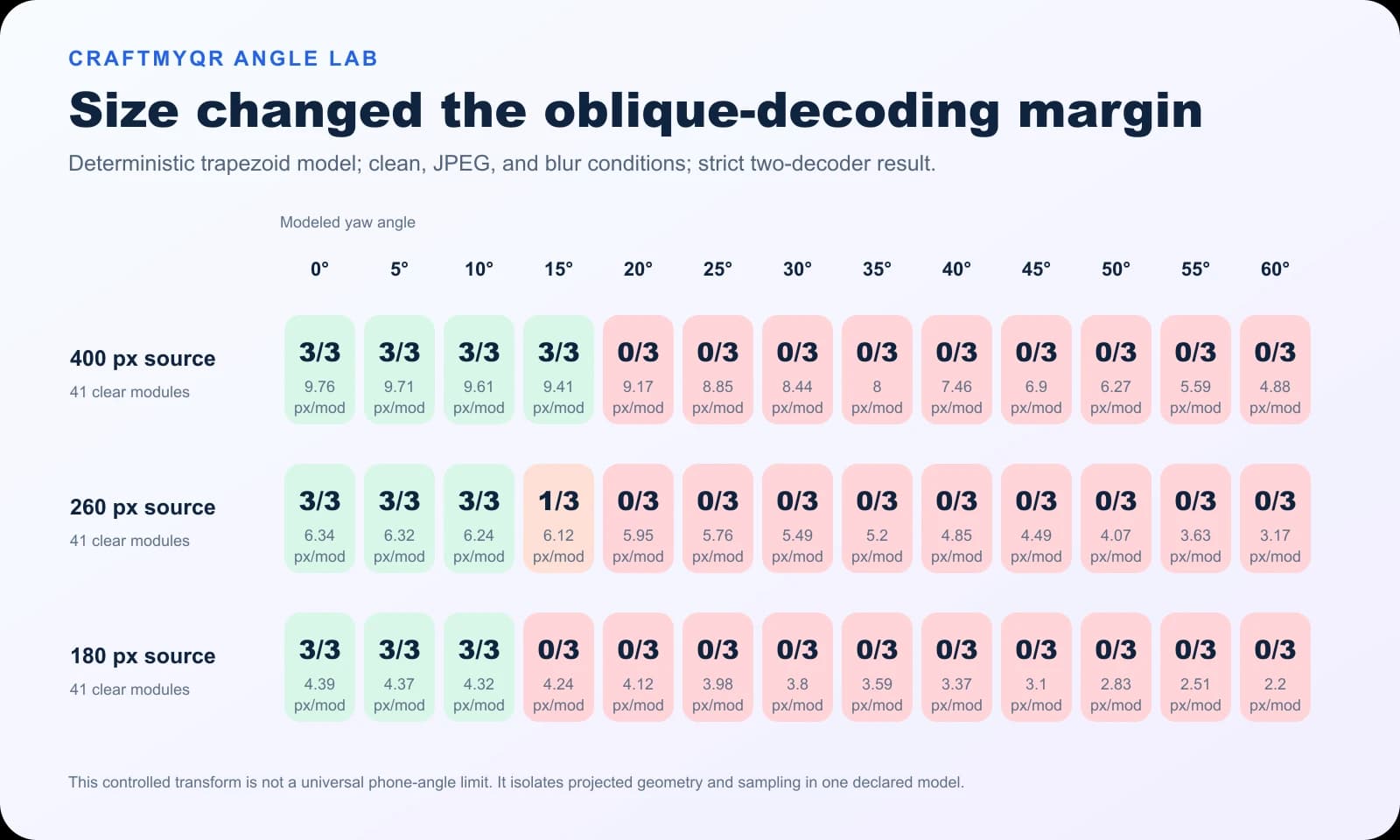
| Source size | Straight-on px/module | Full 3/3 pass through | Next tested result |
|---|---|---|---|
| 400 px | 9.76 | 15° | 20°: 0/3 |
| 260 px | 6.34 | 10° | 15°: 1/3 |
| 180 px | 4.39 | 10° | 15°: 0/3 |
What This QR Code Scan Angle Test Adds
The results add three details that generic “maximum angle” answers usually miss:
The 15- and 20-degree transitions are not phone recommendations. A calibrated camera pipeline with stronger perspective correction may tolerate much more, while glare, motion, low light, curvature, or a dense small code may tolerate less. The finding is the interaction, not a universal number.
- Angle and source size interact. The same modeled geometry produced different results when the initial pixel budget changed.
- Geometry can trigger a cliff. A small five-degree step moved cases from full pass to partial or zero pass.
- Pixels per module do not explain everything. Finder detection, trapezoid correction, raster interpolation, and decoder implementation contribute to the boundary.
Why Real Phones May Behave Differently
Phone camera systems often combine autofocus, exposure control, sharpening, noise reduction, lens correction, and multi-frame processing before a QR decoder receives the image. Field of view, focal length, sensor resolution, and digital zoom change the captured module detail. Apps may also use different libraries or attempt multiple geometric hypotheses.
Materials add another dimension. A glossy sign viewed obliquely may reflect a bright light across the finder patterns. Bottle labels curve away on both sides, while screens may show moiré or PWM banding. None of those effects appears in the planar digital model.
Therefore, do not state that a code “works up to 15 degrees” based on this test. State the exact setup, then run a physical matrix that represents the deployment.
Improve Oblique QR Code Scanning
If users naturally approach from the side, spend less of the design’s geometric margin elsewhere:
Treat the expected QR code scanning angle as a layout input, not a test performed after installation. A wider QR code scanning angle range calls for more size, stronger contrast, and a clearer approach path.
A dynamic QR code can support a concise managed address and later destination changes. It does not fix angle by itself, but a less dense symbol can leave more physical or captured pixels per module at the same overall size.
- Enlarge the complete QR code.
- Shorten the encoded destination to reduce module density.
- Preserve strong dark-on-light contrast.
- Keep the quiet zone clear of frames and nearby text.
- Use a flat, matte, rigid surface where possible.
- Place the code near the expected line of sight rather than on a receding face.
- Avoid seams, folds, corners, and cylindrical edges.
Posters and Wall Signs
Mount the code near eye level and where viewers can step in front of it. If a corridor forces side approaches, enlarge it and test from both directions. Matte finishing often helps more than decorative gloss.
Table Tents and Menus
Users may scan from a seated position, creating vertical and horizontal perspective. Tilt the display toward the expected camera position or provide sufficient size. The restaurant menu QR code guide covers the broader workflow.
Packaging and Bottles
Curvature creates non-planar distortion that a flat trapezoid cannot model. Keep the code away from the strongest curve, enlarge it, and test a real filled package under retail lighting.
Event Check-In
When staff control the scanner, train the approach and provide a fallback lookup. A specified device-and-app pair allows tighter validation than an open consumer campaign, but screen glare and cracked displays still require real proofs.
Build a Physical Angle Test Matrix
Mark repeatable camera positions rather than waving a phone until something scans. A practical matrix includes:
Define the QR code scanning angle from the code’s front-facing normal so the team measures the same geometry. Record horizontal and vertical QR code scanning angle separately when both change in the real installation.
Use a simple fixture or floor marks to improve repeatability. Record angle, distance, device, app, light, and result. Capture failures as carefully as passes. If the code works only after autofocus hunting or repeated attempts, treat that condition as marginal.
The QR codes in print guide helps with size and production variables. For deployed failures, the QR code not scanning guide separates perspective from quiet-zone, contrast, damage, and destination issues.
- three horizontal approach angles, such as straight, mild, and severe;
- two vertical angles representing standing and seated users;
- minimum, expected, and maximum distances;
- ordinary and difficult lighting;
- representative current and older phones;
- every final material, finish, and size.
Angle Versus Scanning Distance
Angle and distance both reduce captured detail, but they do so differently. More distance shrinks both axes. Yaw compresses one axis and adds perspective asymmetry. Combining them can move a code past its boundary faster than either change alone.
Do not approve maximum distance using a straight-on test and then assume the same distance works from the side. Test the realistic combination. If a sign must support long-distance oblique scans, increasing size is usually more dependable than relying on correction software.
Dense codes deserve extra caution. Two symbols with the same outer dimensions can expose different module sizes to the camera. Generate the actual payload before calculating layout space, and re-run the matrix whenever the destination or correction level changes the version.
Limitations of the Digital Lab
The model used one payload, one QR version, one correction level, one depth factor, bilinear sampling, and two software decoders. It excluded lens projection, autofocus, exposure, sensor noise, motion, rolling shutter, glare, curvature, and multi-frame processing.
Because the QR code scanning angle was modeled rather than measured with a physical camera, the result should not be used as a device specification. A future physical QR code scanning angle study would need calibrated positions, representative optics, controlled illumination, and repeat trials.
The three conditions are deterministic observations, not probabilities. The exact transition may also depend on raster alignment and library version. We retain the runner and row-level results so another test can alter one assumption at a time rather than turning the observed boundary into folklore.
Conclusion: Design for the Approach Path
A useful QR code scanning angle decision cannot come from one maximum-degree claim. CraftMyQR’s controlled model shows that size, projected geometry, raster processing, and decoder behavior interact, sometimes with abrupt transitions. Generate the actual symbol with the CraftMyQR QR code generator, place it for the expected approach, and validate the final physical or digital asset.
For open consumer use, favor generous size, conventional contrast, a flat matte surface, and near-frontal access. When oblique scanning is unavoidable, test the combined angle and distance rather than each variable in isolation.
Frequently Asked Questions
What is the maximum QR code scanning angle?
There is no universal maximum. The boundary depends on code size, density, camera detail, perspective correction, focus, lighting, glare, surface shape, and decoder implementation. Test the actual code from the real approach path.
Can you scan a QR code at an angle?
Yes, many scanners correct moderate perspective when the finder patterns remain visible and enough module detail reaches the camera. Reliability declines as compression, blur, glare, distance, curvature, or low contrast consume the remaining margin.
Why does a QR code become a trapezoid in the camera?
A flat square viewed obliquely projects with unequal near and far edges and a compressed receding direction. The decoder estimates that geometry and resamples the grid before interpreting modules and applying error correction.
Does a larger QR code work better at an angle?
Usually, because a larger symbol supplies more captured pixels per module and more tolerance for blur or resampling. Size cannot solve severe glare, hidden finder patterns, extreme curvature, or a decoder that fails to estimate the geometry.
Does error correction fix perspective distortion?
Not directly. Perspective correction estimates and normalizes the grid first; error correction reconstructs eligible damaged codewords afterward. If the scanner cannot locate or sample the symbol reliably, added redundancy may never be used effectively.
How should I position a QR code on a curved bottle?
Place it on the flattest available region, avoid wrapping it around the strongest curve, enlarge it, preserve a clear quiet zone, and test filled production samples from expected distances and horizontal and vertical angles.
Are screen-displayed QR codes more tolerant of angle?
They can have clean edges and adjustable size, but reflections, low brightness, cracked glass, moiré, and viewing-angle effects may reduce reliability. Test the actual screen type, brightness range, and presentation app.
Should I test angle and distance separately?
Test them separately for diagnosis, then together for approval. Distance shrinks both axes, while yaw compresses one axis and adds perspective. Their combination can cross the decoding boundary earlier than either isolated test suggests.
Need to create a QR code now?
Create and preview your QR code with our free generator. For long-term materials like menus, packaging and posters, consider upgrading to dynamic QR codes.