
If you want to know how to add a logo to a QR code, place the logo in the center, give it a simple light backing, use a suitable error-correction level, and test the final exported design at its real size. Do not treat a universal “20% logo” rule as a guarantee. The safe area changes with payload density, error correction, image quality, and the exact modules the logo covers. You can build the design in the CraftMyQR generator, then use the measured workflow below before production.
This guide adds something most logo tutorials omit: a reproducible test across two payload densities, all four QR error-correction levels, five image conditions, and two independent decoders. It shows why a QR code with logo can appear generous in one case and have little reserve in another.
How to Add a Logo to a QR Code Safely
Use this sequence rather than choosing a percentage first:
If the destination may change, a dynamic QR code can keep the encoded redirect concise while letting you update the target later. That can reduce symbol density, although the actual version still depends on the complete encoded string and chosen correction level.
- Encode the shortest practical destination.
- Generate the real QR code before designing around it.
- Keep the three large finder patterns and the quiet zone untouched.
- Center the logo on a plain backing instead of placing a detailed mark directly over modules.
- Start with a small logo and raise error correction only when the resulting density remains practical.
- Export the final artwork, resize it to the actual placement, and test representative phones under realistic light and distance.
Why a QR Code Logo Can Break Scanning
A QR code is not one undifferentiated square. It contains data and error-correction codewords plus structural regions that help a decoder find, orient, and sample the grid. The three large corner targets are finder patterns. Timing patterns help establish the module rhythm, while a four-module quiet zone separates the symbol from surrounding artwork.
DENSO WAVE’s error-correction reference describes four levels: L, M, Q, and H. Higher levels allocate more recovery data, but they can also increase the symbol version and module count. Therefore, selecting H does not create free space. It may improve recovery while making each module smaller at a fixed printed width.
The familiar logo percentage also hides two different measurements. A logo that is 20% of the symbol’s width covers roughly 4% of its geometric area before rounding to module boundaries. A 30%-wide logo covers roughly 9%. Percentage of width and percentage of area are not interchangeable.
Finally, a logo does not necessarily erase every module in its bounding box. Transparent areas, a white backing, rounded corners, and raster alignment change the actual affected cells. For a controlled comparison, our lab used an opaque centered white square. That isolates coverage, but it is intentionally simpler than a real brand mark.
CraftMyQR’s Logo Coverage Experiment
Most search results advise using level Q or H, centering the logo, and staying near a single percentage. Our experiment asked a narrower and more useful question: how much centered coverage retained the unmasked code’s own pass count under the same stress set?
Reproducible Method
We generated two URLs:
Each payload was encoded at L, M, Q, and H. The short URL produced Versions 2–4; the long URL produced Versions 6–10. We then placed a centered opaque white square over the symbol at tested widths from 12% through 48%, plus an unmasked baseline.
Every case went through five deterministic conditions: a clean 260-pixel render, a reduced 170-pixel render, JPEG quality 60, 0.75-pixel blur, and 35-degree horizontal foreshortening combined with light blur. jsQR 1.4.0 and ZXing 0.21.3 both attempted every image. A strict pass required both decoders to return the exact original payload.
The reported value is not “maximum possible logo size.” It is the largest tested mask that kept the same strict pass count as that code’s unmasked baseline. This baseline-aware rule matters because the denser unmasked codes already had less margin under the stress set.
| Test payload | Characters | Purpose |
|---|---|---|
| Short managed-style URL | 29 | Low-density comparison |
| Long campaign URL | 119 | Higher-density comparison |
Logo Coverage Results
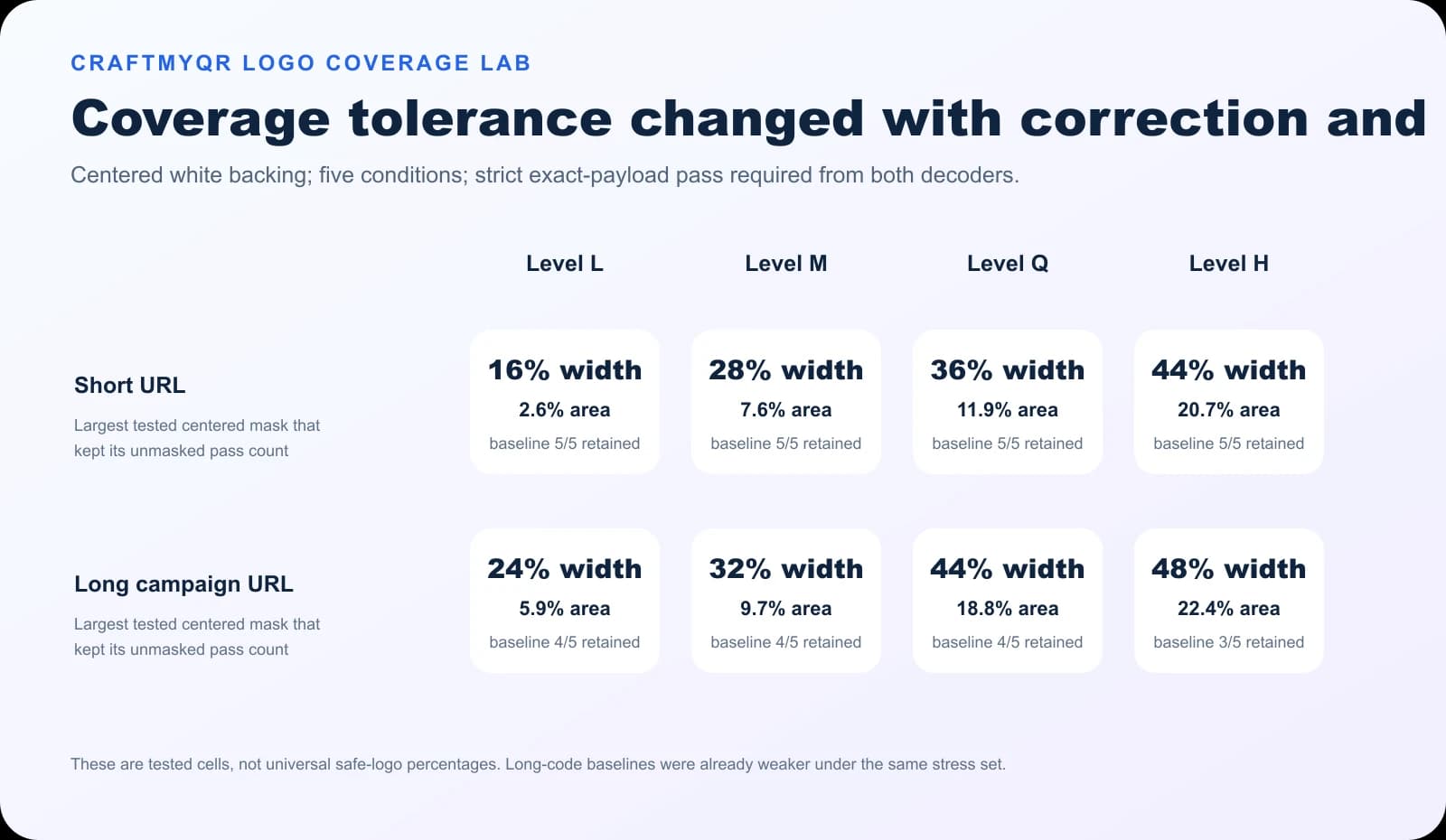
The short URL had a 5/5 unmasked baseline at every level. Its first observed drop appeared at 20% width for L, 32% for M, 40% for Q, and 48% for H. That progression shows the expected benefit of additional recovery data within this controlled setup.
The long URL needs more careful interpretation. Its unmasked baselines were only 4/5 at L, M, and Q, and 3/5 at H because the symbol was denser. The 48% H result means the largest tested mask retained an already weaker 3/5 baseline. It does not mean a 48%-wide logo QR code is a sound production recommendation.
| Payload | Level L | Level M | Level Q | Level H |
|---|---|---|---|---|
| Short URL | 16% width, 2.6% area | 28% width, 7.6% area | 36% width, 11.9% area | 44% width, 20.7% area |
| Long campaign URL | 24% width, 5.9% area | 32% width, 9.7% area | 44% width, 18.8% area | 48% width, 22.4% area |
What the Experiment Adds
Three practical insights go beyond the usual percentage rule:
The surprising higher retained widths for the long payload do not prove dense codes accept larger logos. Rounded mask boundaries covered different module arrangements, and the baseline criterion was lower. This is exactly why a single percentage detached from payload and baseline can mislead.
- Baseline strength matters. A logo can preserve a weak baseline without creating a dependable code.
- Higher correction changes density. The long URL moved from Version 6 at L to Version 10 at H, so recovery and sampling detail changed together.
- A percentage is only a test coordinate. The retained values describe these payloads, masks, conditions, and decoders; they are not universal safe limits.
Choose a Practical Starting Size
For production, start conservatively even when the digital lab shows more headroom. A centered logo around 10–15% of the symbol width is a reasonable first proof for an ordinary URL code. Increase it only after testing the actual asset. This is a workflow starting point, not a QR specification.
A QR code with logo should still begin as a strong code without the logo. Review the unmasked QR code logo baseline first; decoration cannot repair weak contrast, excessive density, or insufficient final size.
Keep these distinctions clear:
For printed work, the QR codes in print guide explains sizing, export, and proofing considerations beyond the logo itself.
- Measure against the symbol area, excluding the quiet zone, but preserve the entire quiet zone in the exported artwork.
- Use a simple backing that separates the logo from busy modules.
- Avoid narrow text, hairlines, or low-contrast logo details that disappear after resizing.
- Leave the corner finder patterns completely visible.
- If the generated grid becomes denser after raising error correction, enlarge the complete QR code.
A Better Final-Format Proof Matrix
A successful scan on a large monitor does not approve a small label. Test the QR code logo after every production transformation: export, layout placement, downsampling, print process, material, lamination, and display lighting.
Use a compact matrix with at least:
Record the exact file, dimensions, material, device, and result. If one condition fails, reduce the logo, shorten the payload, enlarge the complete code, restore contrast, or simplify the mark. Do not solve a failure only by trying a different scanner app.
- the minimum and expected scanning distance;
- straight-on and mildly oblique approaches;
- bright, ordinary, and dim lighting;
- at least one older and one current phone;
- clean and slightly worn samples when the item will be handled;
- every size used in the campaign, not only the largest proof.
Treating H as a License to Cover 30%
Approximate error-correction percentages describe recoverable codewords under suitable damage patterns. They do not authorize covering the same percentage of visible area. Structural damage, clustered erasures, version changes, and sampling quality all affect the result.
Removing the Quiet Zone
A logo may sit in the center, but decorative frames often crowd the outside edge. Preserve a clear four-module border around the complete code. DENSO’s QR code configuration guidance identifies that margin as part of reliable symbol presentation.
Testing Before Resizing
The master SVG may scan while the 18 mm raster export fails. Judge the final dimensions and final file. If a social platform recompresses the image, test the downloaded platform copy too.
Using a Long Tracking URL Directly
Long parameters can raise the version and reduce module size. Where the workflow allows it, use a concise managed destination. If an existing design is unreliable, the QR code not scanning guide provides a broader diagnostic checklist.
Limitations of This Digital Lab
The experiment used software rendering and two decoders, not printed specimens and a representative phone population. It does not model ink spread, glare, autofocus, motion, surface curvature, screen moiré, transparent logo regions, or every decoder’s inversion and preprocessing logic.
Five deterministic conditions are five checks, not a probability of success. The results should guide hypotheses and proof design, not replace physical testing. We retained the runner, raw CSV files, and exact payloads so the method can be repeated and extended instead of presented as an unexplained “safe percentage.”
Conclusion: Add the Logo, Then Prove the Complete Design
The reliable answer to how to add a logo to a qr code is procedural: generate the real payload, center a modest mark, protect structural regions and the quiet zone, choose error correction with density in mind, and test the final format. CraftMyQR gives you a practical QR code generator for building the code and adjusting its design before you run that proof matrix.
The experiment shows why logo width alone is insufficient. Payload density, baseline margin, correction level, rendering, and decoder behavior all interact. Use the measured results to choose a cautious starting point, then let representative physical scans decide whether the logo can grow.
Frequently Asked Questions
Can I put any logo in the center of a QR code?
Most compact logos can work if they have a simple silhouette, adequate contrast, and a clean backing. Detailed marks, fine text, or transparent gaps may behave differently after resizing, so always test the exact final asset rather than a placeholder square.
What is the safest logo size for a QR code?
There is no universal safe percentage. Starting around 10–15% of symbol width is conservative for proofing, but payload density, correction level, export size, material, and camera conditions determine the usable margin for a specific design.
Should I always choose error-correction level H?
No. Level H adds recovery data, but it can also increase the QR version and module density. Compare the generated symbols and test the final size; level Q or M may produce a less dense code with sufficient real-world margin.
Does a white box behind the logo help?
A plain backing separates the mark from QR modules and produces a predictable obstruction. It often improves visual clarity, but it still erases information beneath it. Keep the backing compact and include it in your coverage measurement and proof.
Can the logo cover a finder pattern?
It should not. The three large corner squares help scanners locate and orient the symbol. Keep the logo centered and leave finder patterns, separators, the quiet zone, and nearby structural detail unobstructed whenever possible.
Why does my QR code scan before I add the logo but fail afterward?
The original code may have had little decoding margin. The logo can remove critical modules, while resizing or compression further reduces detail. Shrink the logo, simplify its backing, shorten the payload, enlarge the code, and retest the exported file.
Will a transparent logo preserve the modules underneath?
Only where the underlying modules remain visually distinct after compositing and printing. Semi-transparent colors can reduce contrast instead of preserving clean data. Test the flattened final artwork, because scanners see the rendered result rather than the source layers.
Can I add a logo to a dynamic QR code?
Yes. A dynamic destination can keep the encoded redirect concise and allow later target changes, but the visible QR design remains subject to the same coverage, contrast, quiet-zone, size, and final-format testing requirements.
Need to create a QR code now?
Create and preview your QR code with our free generator. For long-term materials like menus, packaging and posters, consider upgrading to dynamic QR codes.